Ideas → Drafts → Scheduled
Keep ideas, drafts, and scheduled posts together, then let QuickPost publish at the time you picked.
Unlimited scheduled postsQuickPost reads the posts you have already written and uses them as the reference for every draft — so what comes back reads like you, not like everyone else. Start from a voice note, a link, or a single line.
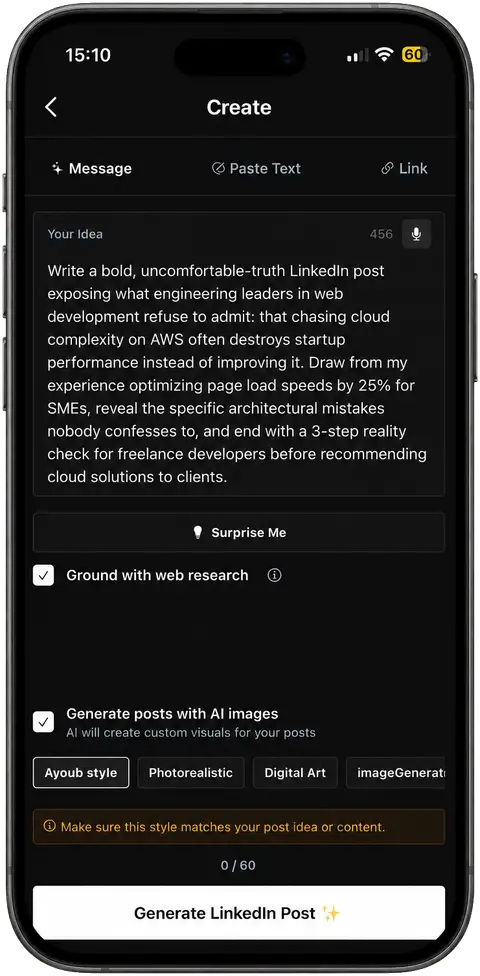
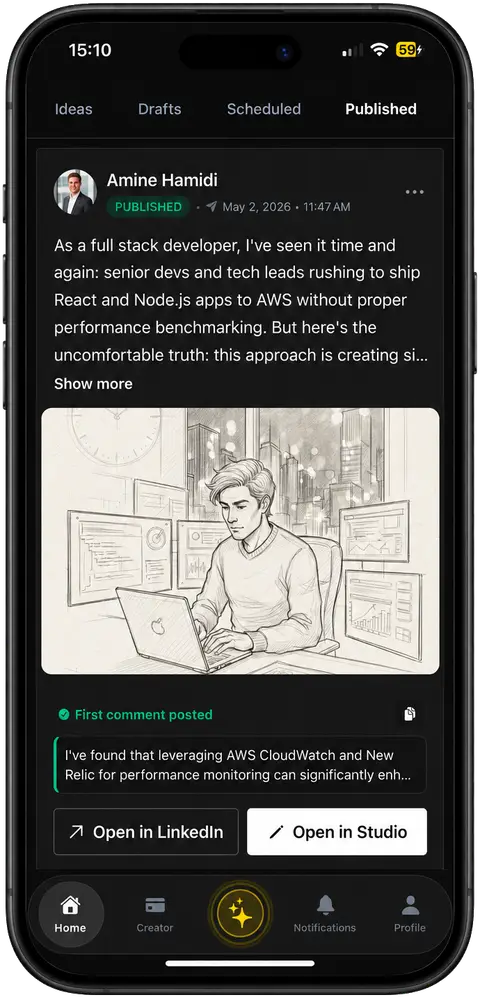
Most tools start from a blank box. QuickPost begins with posts you have already written, learns how you naturally sound, and uses that writing profile for every new draft. Your content stays yours and is never used to train AI.
Connect once. Your industry, expertise, and recurring themes become the brief for every draft.
Record while you walk. The filler and false starts come out; your point stays in.
Your days, your hour, your timezone — each idea arrives with the source article attached.
Describe an idea, paste raw text, or drop a link — the draft comes back in your voice.
Draft on the hooks and rhythm of a style you admire instead of your own.
Quote cards, infographics, and graphs built from the post — or match a reference you upload.
Everything else QuickPost handles, so a finished post never stalls at the last step.
Keep ideas, drafts, and scheduled posts together, then let QuickPost publish at the time you picked.
Unlimited scheduled postsRefine any draft with an instruction — punch up the hook, cut it down, change the ending.
Manual edit or AI editWrite the first comment alongside the post and it lands the moment the post goes live. Save a reusable default.
Fires on publishTurn a selection into a draft, or write a reply in the composer — without leaving the browser.
Connects from your phonePaste a post and get replies worth reading — in your voice, not a chatbot’s.
10 free · 100 on CreatorEnglish, French, or Arabic — and on Creator, every post generated in two languages at once.
EN · FR · ARFour steps — and you review everything before it reaches LinkedIn.
Link your profile in seconds. QuickPost reads your niche, tone, and audience, and keeps that profile as a reference for drafting — not as training data.
Type a line, record a voice note while you walk, or open a Spark we sent you. No polishing needed — that is the next step’s job.
A complete draft comes back in seconds — hook, structure, and an optional visual — grounded in your profile.
Read it, change whatever you want, then pick a time. Nothing reaches LinkedIn until you approve it.
QuickPost helps with the repetitive work around creating LinkedIn content while you keep the final say on every post.
Turn a rough idea, existing text, or useful link into a structured draft grounded in your own past writing, topics, and expertise.
Record an idea in the QuickPost mobile app. It removes filler, keeps your point, and turns the recording into an editable LinkedIn draft.
Review the post, choose the date and time, and let QuickPost publish the approved version to LinkedIn on schedule.
Find timely angles and source articles related to your field, then develop the useful ones into posts instead of starting from a blank page.
QuickPost helps create and schedule content. It does not send automated outreach, connection requests, or unwanted engagement. You review and approve every post before it goes live.
Start free. Upgrade when you are posting often enough to need the volume.
Everything you need to write, schedule, and publish on a steady cadence.
For daily posting: more posts and images, more creative choices, and a second language.
Billed via Apple App Store. iOS only at launch.
Join the founders, creators, and operators using QuickPost to post consistently without it eating their week.
Free to start · No credit card